

♥ Wishlist


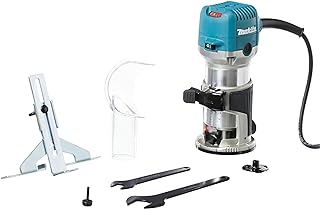


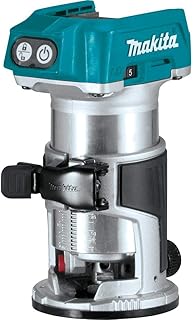

Makita cordless routers give Canadian woodworkers the freedom to perform routing work without managing a power cord across the workpiece. They can be useful for DIY projects, furniture making, cabinetry, trim work, laminate trimming, edge profiling and other woodworking applications where controlled cutting and easy manoeuvrability matter. The right model depends less on choosing the biggest or most powerful router and more on matching the router's design, battery platform and capabilities to the jobs you expect to perform.
Compact cordless routers are particularly useful when control and portability are priorities. Their smaller form can make them easier to guide around narrow edges, smaller components and detailed work. Common applications include rounding edges, creating chamfers, trimming laminates, flush-trimming material and producing decorative profiles. For users who frequently work on shelves, furniture components, doors, signs or smaller joinery projects, a compact router can provide a convenient balance between capability and handling.
For more demanding routing operations, a larger Makita cordless router may be a better fit. More substantial models can be suited to deeper grooves, larger profiles and heavier material removal when used with the correct cutter and technique. The trade-off is additional size and weight, so consider how long you will be holding the tool and how much manoeuvrability your projects require. A larger router is not automatically the better choice if most of your work involves light edge profiling.
Battery compatibility should be one of the first things Canadian shoppers check. Makita cordless tools are offered across different battery systems, so do not assume that every Makita battery will work with every router. Verify the exact voltage, battery series and manufacturer-stated compatibility for the model you are considering. If you already own compatible Makita batteries and chargers, a tool-only router can potentially be a practical addition to your existing collection. If you are new to the platform, compare the total cost of a complete kit with the price of the tool alone.
Motor design, speed control, depth adjustment, base stability and ergonomics can all affect routing performance. Some Makita cordless routers use brushless motor technology, which can provide efficient power delivery without conventional motor brushes. Electronic speed control can help maintain consistent operation as cutting loads change, while soft-start functionality can make initial startup easier to control.
Variable speed is especially useful when working with different cutter sizes and materials. The correct speed depends on the router, bit, material and manufacturer's recommendations, so always stay within the stated operating limits. Precise depth adjustment is also valuable when producing repeatable grooves, recesses or matching profiles. A stable base and clear view of the cutting area can further improve control during edge work.
The router is only one part of the cutting system. Straight bits can be used for grooves, dados and recesses, while round-over and chamfer bits are useful for shaping edges. Flush-trim bits can help bring one surface into alignment with another material or template. Before buying bits, confirm the compatible collet and shank diameter for the exact router. Guides, template accessories, alternative bases and dust-collection components can also expand the tool's usefulness, but compatibility should always be verified before purchase.
When comparing Makita cordless routers in Canada, look beyond the headline specification. Consider the workpiece size, typical cutting depth, cutter requirements, battery capacity, overall weight and expected runtime. A higher-capacity battery may extend working time but can add weight, while a smaller battery can make a compact router easier to manoeuvre. For longer sessions, having a second compatible battery can sometimes be more practical than relying on the largest available battery.
Also check whether each listing is tool-only or a complete kit. Package contents can vary, and a lower upfront price may not represent the lower overall cost if you still need to purchase batteries, a charger or essential accessories. Canadian shoppers should also review current retailer information, availability, delivery conditions, seller details and applicable purchase terms before ordering.
Finally, choose the router according to your actual workflow. A compact model can be an excellent choice for trimming, edge profiling and smaller woodworking tasks, while a larger router may be preferable for deeper or heavier routing. If you already use Makita cordless tools, battery compatibility can simplify your setup. If this is your first router, prioritise the capabilities, handling and accessories required for your projects rather than selecting a model solely because of its battery voltage or power rating.
Find the right Makita cordless router for your woodworking projects, from edge trimming and laminate work to furniture making, cabinetry and detailed joinery. Compare compact and larger routing options by battery platform, motor design, speed control, depth adjustment, base configuration, bit compatibility and overall handling. Whether you already own compatible Makita batteries or are building a new cordless setup, choosing the right router starts with matching the tool to the work you actually perform.
Canadian DIY users, woodworkers, cabinet makers, furniture makers, tradespeople and professional workshop users comparing Makita cordless routers.