

Explore cordless power tools, kits, batteries, chargers, accessories and related equipment available to Canadian shoppers. Compare product options and follow useful buying guides before you buy.


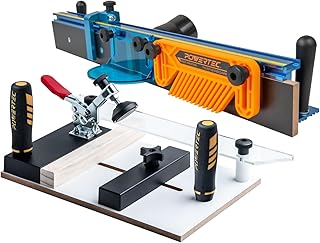


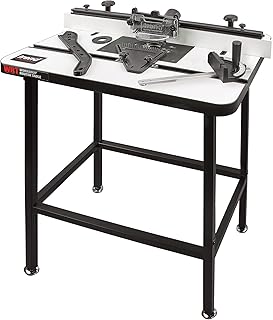


A router table can turn a handheld router into a more controlled stationary woodworking tool. For Canadian woodworkers, the right setup can make edge profiling, joinery, trimming, pattern work and repeated cuts easier to manage. However, choosing a router table is not simply a matter of finding the largest surface or the lowest price. Compatibility, table rigidity, fence design, insert-plate quality, dust collection and available workspace can all affect how practical a particular model is.
This guide focuses on the factors that matter when comparing router tables in Canada in 2026. Product specifications, included accessories and compatibility can vary by model and manufacturer, so always verify the current details before purchasing. Brands such as Bosch, DEWALT, Kreg, SKIL, Triton and Bosch Professional are commonly associated with woodworking and routing equipment, but the best choice depends on your router, projects and workshop setup.
A router table provides a stable surface around a mounted router. Instead of moving the router across the workpiece, the operator guides the material across the cutter. This arrangement can provide useful control when working with narrow stock, long edges or repeated profiles.
Stationary routing can also make certain operations more convenient. A properly configured table can provide support for the workpiece while the fence establishes a consistent reference point. This is particularly useful for tasks where maintaining a repeatable cutting position matters.
A router table does not automatically make routing safer or more accurate. The operator still needs appropriate training, correct cutter selection, secure workholding and suitable personal protective equipment. Always follow the router and router-table manufacturer's instructions.
The working surface determines how much support is available around the router bit. A larger table can be helpful for bigger workpieces because it provides more room to maintain control. A compact table may be preferable for a small workshop, portable setup or occasional woodworking.
Do not judge table size in isolation. Consider the dimensions of the material you normally work with and whether the table can be supported or extended when necessary.
Rigidity is one of the most important characteristics of a router table. The table should remain stable when the workpiece is pushed against the fence. Excessive flex can make consistent routing more difficult.
Look at the construction of the tabletop, mounting structure, legs or base, and connection points. A sturdy design can be especially valuable when using larger routers or working with heavier stock.
Compatibility should be checked before considering almost any other feature. Router tables are not universally compatible with every router. Mounting patterns, base dimensions, router orientation and adjustment mechanisms can differ significantly.
Check the manufacturer's compatibility information for your exact router model. A table that looks suitable may still require a different mounting plate, additional hardware or an alternative configuration.
The insert or mounting plate forms the connection between the router and table. A quality plate should remain stable and sit appropriately within the tabletop.
Important considerations include plate dimensions, thickness, mounting-hole pattern, levelling provisions and insert-ring compatibility. A plate with adjustable levelling points can help keep the surface transition smooth.
Insert rings reduce the opening around the router bit. The objective is to provide appropriate support around the cutter without interfering with its rotation.
When comparing tables, examine which insert sizes are supplied and whether replacement or additional rings are readily available. A broader selection can make the table more adaptable to different router bits.
The fence is one of the most important components because it establishes a reference surface for the workpiece. A fence should be easy to adjust while remaining secure after positioning.
Look for a fence with practical adjustment controls, a straight working face and sufficient support for the material being routed. Split-fence designs can provide additional flexibility for dust collection and certain routing operations.
Replaceable or adjustable fence faces can be useful when setting the opening around a router bit. They may also make it easier to configure the fence for different operations.
When comparing models, consider the fence-face dimensions and whether the design allows accessories or auxiliary faces to be fitted. This can be more useful than choosing a table solely because of its headline tabletop size.
Routing produces chips and fine dust. A router table with an effective dust-collection arrangement can help keep the work area cleaner and improve visibility around the cutting area.
Check whether the dust port connects to the vacuum equipment you already use. Port dimensions and adapter requirements vary, so compatibility should be confirmed before purchase.
Benchtop models are designed for users who have limited workshop space or want a more portable setup. They can be practical for smaller projects and occasional routing.
Freestanding designs provide a dedicated routing station. Their larger footprint can offer more workspace and a more substantial base.
The better configuration depends on your workshop rather than a simple ranking. A compact benchtop table can be the more practical choice for a small garage, while a larger stationary setup may suit frequent woodworking and larger projects.
Router tables can use different combinations of metal, engineered wood, plastic, laminate and other materials. Each construction approach has advantages and compromises.
A smooth tabletop helps the workpiece move consistently. Laminated surfaces can provide low-friction movement, while metal components may contribute rigidity and durability depending on the design.
Pay attention to flatness as well as surface finish. A smooth but poorly supported table can be less useful than a properly supported surface with a practical working area.
A stable base reduces movement during operation. For freestanding models, examine the leg structure, cross supports and overall footprint.
Adjustable feet can be useful on uneven workshop floors. If a table can be fitted to a mobile base or equipped with casters, verify that the added mobility does not compromise stability during routing.
Some advanced router-table configurations use a router lift. A lift allows the bit height to be adjusted from above the table, depending on the design.
This can be convenient for frequent setup changes, but not every router table includes a lift and not every router is compatible with every lift. If above-table adjustment is important to you, treat router-lift compatibility as a separate specification to verify.
For occasional woodworking, a conventional adjustment system may be sufficient. For repetitive work, convenient height adjustment can become considerably more valuable.
Router tables should be selected around the router you intend to mount. Higher-powered routers can be appropriate for demanding work, but power alone does not determine whether a router-table setup is suitable.
Consider the router's physical dimensions, mounting method, speed control, collet capacity and manufacturer's instructions. Variable-speed control can be useful because different router bits and materials may require different operating speeds.
Never assume that a powerful handheld router can be mounted safely in a particular table without checking compatibility documentation.
The router table should complement the bits you actually use. Common woodworking bits include straight bits, flush-trim bits, round-over bits, chamfer bits, rabbeting bits and pattern-related cutters.
Larger cutters can require specific operating speeds and appropriate table configurations. Always follow the bit manufacturer's instructions regarding maximum speed, workpiece dimensions and safe operation.
Before purchasing a table, consider the diameter and shank size of your existing router-bit collection. A table itself does not determine which cutters are safe to use.
Safety should be part of the buying decision rather than an afterthought. A router table places a rotating cutting tool beneath the work surface, so stable construction and sensible controls are important.
Featherboards and push accessories can help maintain controlled workpiece movement for appropriate operations. They do not replace safe operating procedures, guards or proper technique.
A low purchase price can be attractive, but the least expensive table may not provide the rigidity, compatibility or adjustment features required for your projects.
This is one of the most avoidable mistakes. Always identify the exact router model before choosing the mounting system.
A compact design saves space, but insufficient workpiece support can make larger projects inconvenient. Think about your typical stock dimensions before deciding.
A good tabletop cannot compensate for a difficult-to-adjust or insecure fence. Evaluate the fence as carefully as the table itself.
If the table cannot connect conveniently to your existing dust extractor or shop vacuum, cleanup may become unnecessarily difficult.
Additional accessories can increase versatility, but they can also increase complexity. Choose features that solve actual problems in your workshop.
When comparing several models, use the same criteria for each one. This prevents an attractive specification from overshadowing an important limitation.
For a compact workshop, dimensions and storage can matter more than having every available feature. A benchtop design may be easier to store when not in use.
Measure your available bench and storage area first. Remember to account for clearance around the router table, especially where longer workpieces will extend beyond the tabletop.
Frequent users should pay particular attention to rigidity, fence adjustment, mounting accuracy and height-adjustment convenience. A stable workstation can be more valuable than a long list of accessories.
If the router table will be used regularly, also consider how easily common maintenance tasks can be performed. Convenient access to the router, insert plate and dust-collection system can make repeated setup less frustrating.
Beginners can benefit from a straightforward design that is easy to assemble, adjust and understand. Complicated accessories are not necessarily an advantage when learning basic routing techniques.
Look for clear instructions, stable mounting, an accessible fence and a sensible operating arrangement. Learning the correct feed direction and understanding how the router bit interacts with the workpiece are more important than owning the most feature-heavy table.
Brand reputation can be a useful starting point, but it should not replace model-specific comparison. Bosch, DEWALT, Kreg, SKIL and Triton offer woodworking products across different categories, and individual models can vary considerably in design and compatibility.
When comparing branded products, check the exact model number and current manufacturer specifications. Accessories, mounting plates and compatible routers may differ between product generations.
Featherboards can help maintain controlled lateral pressure against the fence or table during suitable operations. They are particularly useful when repeatable stock positioning is important.
Push blocks can help keep hands away from the cutting area while guiding material through appropriate cuts. Choose an accessory designed for the operation and follow its instructions.
Extensions can provide additional support for larger workpieces. If you regularly work with long boards, extension compatibility may be more useful than choosing a table with a compact footprint.
Adapters, hoses and connectors can affect how effectively a router table integrates into an existing dust-management system. Confirm dimensions rather than assuming that all workshop vacuum accessories are interchangeable.
Regular inspection helps maintain a consistent router-table setup. Before use, check that the router is securely mounted and that the fence and other adjustable components are locked appropriately.
Router bits should also be inspected regularly. A damaged, dull or improperly installed bit can affect cut quality and increase operating risk. Follow the bit manufacturer's guidance for inspection and replacement.
Cut quality depends on more than the router table. Bit sharpness, feed speed, material characteristics, cutter selection and setup all contribute to the result.
For demanding profiles, avoid trying to remove excessive material in one pass when the operation is better suited to multiple controlled passes. The appropriate approach depends on the cutter, material and manufacturer's instructions.
Consistent workpiece pressure against the fence is also important. Let the cutter do the work rather than forcing the material through the bit.
A handheld router remains highly versatile because the tool can move directly across the workpiece. A router table provides a different working method that can be advantageous for repeatable edge work and supported stationary routing.
Many woodworkers can benefit from having access to both configurations. The decision should depend on the operations you perform rather than treating one setup as universally better.
Canadian buyers should verify the current product details and retailer information before placing an order. Product availability, included accessories and specifications can change over time.
These checks are especially important when comparing older and newer versions of a product. Product names can remain similar while included accessories or specifications change.
There is no single router table that is best for every Canadian buyer. The right choice depends on router compatibility, workspace, project type, table rigidity, fence quality, dust collection and budget. Compare these factors against your actual requirements rather than choosing solely from a ranking.
No. Compatibility varies between router tables and router models. Always check the manufacturer's compatibility information before purchasing.
A benchtop model can be a practical choice for users with limited space or those who need a portable setup. It may be less suitable for large workpieces that require extensive support.
Not necessarily. A router lift can make above-table height adjustment more convenient, particularly for frequent users. Occasional users may prefer a simpler configuration.
Choose a size based on your available workshop space and typical workpiece dimensions. Larger surfaces generally provide more support, while compact tables are easier to store.
Yes. Routing produces chips and dust, so a compatible dust-collection system can make the workspace easier to manage. Check port dimensions and vacuum compatibility before buying.
No. Price does not automatically determine suitability. A moderately priced table with the right compatibility, stability and fence design can be more useful than a more expensive model with features you do not need.
Brands such as Bosch, DEWALT, Kreg, SKIL and Triton have products associated with woodworking and routing equipment. Always compare individual models because specifications and compatibility vary.
The best router table in Canada for 2026 is the one that fits your router, workshop and woodworking requirements without forcing you to compromise on essential stability or compatibility. Start with the router you already own or intend to use, then evaluate the mounting system, tabletop, fence, insert plate, dust collection and available workspace.
For occasional users, simplicity and storage may be the priorities. For frequent woodworkers, rigidity, adjustment convenience and accessory compatibility can justify choosing a more advanced setup. Before purchasing, compare current specifications, verify the exact model, read verified customer reviews and check today's retailer pricing.
A careful comparison is more useful than selecting a router table based on a headline ranking alone. By matching the table's construction and features to your actual woodworking tasks, you can narrow the choices and select a setup that makes sense for your Canadian workshop in 2026.