

Explore cordless power tools, kits, batteries, chargers, accessories and related equipment available to Canadian shoppers. Compare product options and follow useful buying guides before you buy.


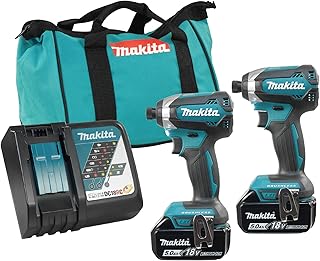


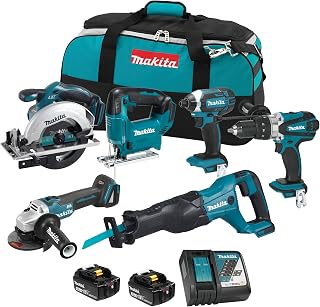


Choosing the right Makita cordless impact driver in Canada involves more than comparing maximum torque figures. A good impact driver should match the type of fastening work you perform, the materials you work with, the battery platform you already own, and the conditions in which you expect to use the tool. For Canadian buyers, temperature, availability of compatible batteries and chargers, warranty terms, and the difference between compact and high-output models can also influence the decision.
Makita has a broad cordless tool ecosystem, so buyers can choose between compact impact drivers for everyday fastening and higher-performance models intended for demanding applications. The right choice depends on whether you are assembling furniture, installing cabinets, building decks, driving structural fasteners, performing renovation work, or handling professional construction tasks.
This guide focuses on the factors that matter when comparing Makita cordless impact drivers in Canada in 2026. Rather than relying on a single specification, consider the complete combination of power, control, ergonomics, battery compatibility, speed settings, chuck design, size, and intended application.
A cordless impact driver combines a rotating motor with an impact mechanism that assists the tool when resistance increases. This design makes an impact driver particularly useful for driving screws, bolts, lag screws, and other compatible fasteners.
Compared with a conventional drill, an impact driver generally uses a hex-style quick-change chuck and is designed around high-speed fastening and rotational impact. This can make it more comfortable for repetitive fastening tasks and useful when a standard drill begins to struggle with high-resistance fasteners.
Makita's cordless range is especially relevant for buyers who already own compatible batteries. Staying within one battery platform can reduce the need to purchase additional battery systems and chargers. Before buying a bare tool, however, confirm exactly which battery platform and voltage family the model uses.
An impact driver and cordless drill are complementary tools rather than direct replacements for one another. A drill is usually the more versatile option when drilling different hole sizes, using conventional drill bits, or performing controlled low-speed drilling. An impact driver is optimized for fastening and is particularly useful when higher resistance is encountered.
The chuck system is another important difference. Many impact drivers use a 1/4-inch hex quick-change interface, making it convenient to change compatible driver bits. A conventional drill commonly uses a keyed or keyless drill chuck that accepts a wider variety of drill bits and accessories.
If you frequently drill masonry, large holes, or precision holes, an impact driver should not automatically replace your drill. If most of your work involves driving screws and fasteners, an impact driver can be a valuable addition to a cordless tool collection.
Torque is one of the specifications that attracts the most attention when comparing impact drivers, but the highest published figure is not automatically the best choice. Excessive power can make delicate fastening more difficult if the tool does not provide adequate control.
Look at torque alongside speed settings, impact rate, electronic control, and the type of fasteners you normally use. A professional working on heavy construction may benefit from a higher-output model, while a homeowner performing cabinet installation may place greater value on compact dimensions and controllability.
Multiple electronic speed modes can make an impact driver considerably more versatile. Lower settings can help reduce the risk of overdriving smaller screws, while higher settings can be useful when driving larger fasteners.
When comparing models, determine how the speed modes are selected and whether the available settings are practical for your typical work. A tool with sophisticated electronic controls can be more useful than one that simply offers a higher maximum speed.
The impact rate describes how frequently the impact mechanism operates. A higher impact rate can contribute to efficient fastening, but it should not be considered independently from torque, motor performance, trigger control, and the fastener being driven.
For buying decisions, treat impact rate as one part of the overall performance picture rather than the primary measure of quality.
Many modern Makita cordless tools are available with brushless motor technology. Brushless motors eliminate traditional motor brushes and can provide advantages in efficiency, durability, and electronic control.
A brushless impact driver can be especially attractive for professionals and frequent users who expect to operate the tool regularly. Occasional users may still find a more basic model sufficient, depending on the price difference and intended workload.
Battery compatibility deserves careful attention before purchasing a cordless impact driver. Makita offers different cordless platforms, and batteries are not universally interchangeable across every Makita tool family.
If you already own Makita batteries, identify the exact battery series before choosing a bare tool. Check the manufacturer's compatibility information rather than assuming that two tools with similar voltage labels use the same battery.
For buyers starting from scratch, compare the broader tool ecosystem. A battery platform becomes more valuable when you plan to add other tools such as drills, circular saws, reciprocating saws, grinders, lights, sanders, or outdoor equipment.
Battery capacity can influence runtime, weight, balance, and overall comfort. A larger battery may provide longer operating time but can also increase the weight of the tool.
For overhead work, cabinet installation, or prolonged fastening, a compact battery may create a more comfortable setup. For demanding construction applications, a higher-capacity battery may be preferable when longer runtime is more important than minimum weight.
Runtime also depends heavily on workload. Driving short screws into softwood consumes considerably less energy than repeatedly driving large fasteners into dense materials. Therefore, published battery specifications should be interpreted as platform information rather than a guarantee of runtime for a particular job.
Compact impact drivers are designed around maneuverability and access. Their shorter head length can be useful inside cabinets, between framing members, and in other confined spaces.
Higher-performance impact drivers may be better suited to demanding fastening work. They can provide additional capability for larger fasteners and heavy-duty applications, but their increased output may not be necessary for every user.
Before choosing the most powerful model available, consider whether you actually need that level of performance. For many household and light renovation tasks, compact dimensions, low weight, and precise control can be more useful than maximum output.
Impact drivers are often used repeatedly, so ergonomics can have a major effect on the ownership experience. Examine the handle shape, trigger position, grip surface, balance between the motor and battery, and overall weight.
A well-balanced tool can feel easier to control even when its published weight is similar to another model. If possible, compare the complete tool configuration rather than evaluating the bare tool alone.
A common feature of cordless impact drivers is a 1/4-inch hex quick-change chuck. This design allows compatible hex-shank driver bits and accessories to be installed quickly.
Not every accessory designed for a conventional drill should be used in an impact driver. Look for accessories specifically designed and rated for impact applications when required. Impact-rated bits are engineered for the repeated shock loading produced by an impact mechanism.
Using inappropriate accessories can result in premature wear or breakage. Always follow the accessory manufacturer's instructions and the impact driver's operating guidance.
Buying a powerful impact driver without suitable accessories is a common mistake. Standard driver bits may not be designed to withstand repeated impact forces.
When building an accessory collection, consider impact-rated Phillips, Torx, square, hex, and other commonly used driver bits according to the fasteners you encounter. Socket adapters and impact-rated sockets can also expand the tool's usefulness for compatible applications.
Brands such as Makita, Milwaukee, DEWALT, Bosch, and other established tool manufacturers offer accessory ranges, but compatibility and impact rating should always be checked before use.
Power is useful only when it can be controlled. Electronic controls can help users adapt tool behaviour to different fastening requirements.
For small screws, softer materials, finished surfaces, or delicate assemblies, excessive force can damage the workpiece or strip the fastener. For larger fasteners, insufficient power can make the job unnecessarily slow.
When comparing Makita impact drivers, investigate the available operating modes and how they affect speed, impact behaviour, and fastening control. This is particularly important for users who switch frequently between different materials and fastener sizes.
A homeowner usually does not need the highest-output impact driver. A compact model with good trigger control, dependable battery compatibility, and enough power for common household fastening tasks may provide a better overall fit.
Prioritize ease of handling, battery availability, accessory compatibility, and the type of projects you actually perform.
Cabinet installation and furniture assembly require control. Compact dimensions can be particularly useful in confined spaces, while lower operating modes can help prevent overdriving screws.
A smaller battery can also improve balance during extended installation work, provided its runtime is adequate for the project.
Deck construction can involve a large number of fasteners, making battery runtime, motor performance, ergonomics, and durability important considerations.
For repeated outdoor fastening, select a model and battery combination appropriate for the fastener sizes and materials involved. Also consider weather conditions and follow the manufacturer's operating instructions for the tool and battery.
Professional users should consider more than peak specifications. Tool downtime, battery ecosystem compatibility, ergonomic design, control features, accessory availability, and suitability for repetitive work can all influence productivity.
If the impact driver will be used daily, investing in a configuration that fits the broader cordless tool system can make more sense than selecting a model solely because it has the highest output.
Makita and DEWALT both offer extensive cordless tool ecosystems. The better choice often depends on the battery platform you already use and the other cordless tools you intend to purchase.
Compare individual models rather than assuming that one brand is universally superior. Look at size, torque, speed control, battery compatibility, ergonomics, and the specific requirements of your projects.
Milwaukee is another major competitor in professional cordless tools. Its impact driver range includes products aimed at different performance levels, just as Makita offers multiple options.
For a fair comparison, compare equivalent tool classes. A compact Makita model should be compared with a similarly positioned Milwaukee model rather than with a substantially larger high-output tool.
Bosch also offers cordless fastening tools and accessories. Bosch can be worth considering when its battery ecosystem, tool dimensions, or available features better match your needs.
The best purchase is usually the model that fits your existing equipment and intended workload rather than simply the brand with the most recognizable specifications.
Maximum torque is easy to compare but does not tell the complete story. A tool with excellent control and suitable output may be more useful for everyday work than an unnecessarily powerful model.
Never assume that all Makita cordless batteries fit every Makita cordless tool. Verify the exact battery platform before purchasing.
A bare tool can appear attractive when you already have compatible batteries. For a new cordless-tool user, however, the complete cost may include batteries and a charger.
Compare the total system cost rather than looking only at the tool price.
Impact drivers place repeated shock loads on accessories. Use suitable impact-rated accessories when the application requires them.
A larger tool can provide impressive performance but may be inconvenient in tight spaces. Consider access requirements before choosing a high-output model.
More power is not automatically better. Excessive output can make delicate fastening harder to control and may increase tool weight or size.
Customer reviews can provide useful information, but they should be evaluated carefully. A review is most useful when it explains the application, workload, battery configuration, and specific strengths or limitations encountered.
Look for recurring observations across many verified customer reviews instead of relying on one extremely positive or negative comment. Pay attention to comments about balance, controls, battery life, bit retention, durability, heat, and suitability for the intended task.
Also distinguish between reviews of the tool itself and reviews of a complete kit. A kit may include a particular battery, charger, case, or accessory set that changes the overall value.
Canadian shoppers should compare the exact model number, included accessories, battery configuration, and retailer information before purchasing. Product names can be similar across different kits, while the included battery capacity or charger may differ.
Prices and availability can also change. For this reason, compare current listings rather than relying on an old advertised price or assuming that every retailer offers the same package.
When shopping online, verify that the product is intended for the Canadian market and carefully review the manufacturer's warranty information, retailer return conditions, shipping terms, and applicable product documentation before placing an order.
Canadian users may operate cordless tools in colder conditions, particularly during construction, outdoor maintenance, and seasonal projects. Lithium-ion batteries can behave differently at low temperatures, so users should follow the battery manufacturer's storage, charging, and operating instructions.
Do not assume that a battery's normal indoor performance will be identical in extreme cold. Proper storage and charging practices are important for maintaining battery performance and service life.
For outdoor projects, keep batteries protected from unnecessary exposure to moisture and temperature extremes and follow the manufacturer's safety guidance.
Routine maintenance can help keep a cordless impact driver ready for work. Keep the exterior clean and prevent excessive dust and debris from accumulating around ventilation openings.
Inspect the bit holder regularly and remove debris that could interfere with accessory installation. Check driver bits for excessive wear, deformation, or damage and replace unsuitable accessories.
Battery contacts should be kept clean and dry. Store batteries and the tool according to the manufacturer's recommendations, particularly when the equipment will not be used for an extended period.
If the tool develops unusual noise, excessive heat, inconsistent operation, or another problem outside normal behaviour, stop using it and consult the manufacturer's service guidance.
Two listings for the same general tool can represent very different packages. One may be sold as a bare tool, while another may include one or more batteries, a charger, a case, and accessories.
When comparing kits, calculate the value of the complete package. If you already have compatible batteries and chargers, a bare tool may be practical. If you are entering the battery platform for the first time, a complete kit may simplify the purchase.
A compact model is a strong candidate for users who regularly work in confined spaces, perform installation work, assemble furniture, or value low weight and maneuverability.
It can also be a sensible choice for homeowners who want an impact driver without carrying a larger high-output tool for routine fastening.
A higher-output model is more appropriate when your work regularly involves larger fasteners, dense materials, structural fastening, or demanding professional applications.
Even then, consider whether the additional performance is genuinely useful for your work. If most jobs involve smaller screws, the additional size and power may provide little practical benefit.
The best Makita cordless impact driver depends on your applications, battery platform, desired size, power requirements, and budget. A compact model can be ideal for installation and DIY work, while a higher-output model may be better for demanding construction tasks.
Yes. A suitable Makita impact driver can be useful for many DIY fastening applications, including furniture assembly, renovation projects, shelving, woodworking, and outdoor construction. Choose the output level based on the fasteners and materials you normally use.
Not completely. An impact driver is excellent for fastening, while a drill is generally more versatile for drilling. Many users benefit from owning both tools.
Battery compatibility depends on the specific Makita cordless platform. Always verify compatibility using the exact tool and battery model information before purchasing.
A brushless model can be attractive for frequent users because of its motor design and electronic control capabilities. Whether it is worth the additional cost depends on your workload, expected service life, and the features offered by the specific model.
The appropriate battery depends on the balance between runtime and weight. Compact batteries can improve maneuverability, while higher-capacity batteries can be useful for longer or more demanding work.
Use accessories specifically designed for impact applications when required. Standard bits may not be engineered for repeated impact forces, so always follow the accessory manufacturer's recommendations.
No. Higher torque can be useful for demanding fastening, but control, size, weight, speed settings, and the intended application are equally important.
Check the exact model number, battery platform, included accessories, current price, retailer return policy, warranty information, and Canadian-market compatibility. Product packages can differ even when product names appear similar.
The best Makita cordless impact driver is not necessarily the model with the largest torque number or the most advanced specification sheet. The right choice is the one that delivers appropriate fastening performance while fitting your battery ecosystem, working environment, comfort requirements, and typical projects.
For DIY users and homeowners, compact dimensions, manageable power, and straightforward controls may be the most valuable qualities. For tradespeople and frequent users, battery compatibility, motor performance, electronic control, ergonomics, accessory support, and long-term suitability deserve greater attention.
Before purchasing, compare the exact model specifications and complete kit contents, read verified customer feedback, and check current Canadian retailer information. Taking these factors together makes it easier to select a Makita cordless impact driver that matches the work you actually intend to perform in 2026.