

Explore cordless power tools, kits, batteries, chargers, accessories and related equipment available to Canadian shoppers. Compare product options and follow useful buying guides before you buy.


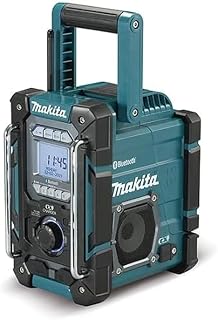
Choosing the right Makita cordless radio involves more than comparing sound quality. A jobsite radio may need to handle dust, occasional splashes, vibration, temperature changes and long working sessions while remaining easy to carry around a workshop, garage, renovation site or outdoor workspace. The best choice depends on how you plan to use it, which Makita battery platform you already own, how important portability is and whether you need features such as Bluetooth, USB charging, radio reception or auxiliary connectivity.
Makita has developed several cordless radio formats for different users. Some models focus on compact portability, while larger units place greater emphasis on sound output, battery runtime and additional functions. Because specifications and included accessories can vary between individual models and Canadian listings, check the exact model number and retailer description before purchasing.
For Canadian buyers, battery compatibility deserves particular attention. A cordless radio can be an especially convenient addition to a Makita tool collection when you already have compatible batteries and a suitable charger. If you are buying into the platform for the first time, however, the cost of batteries and charging equipment should be considered alongside the radio itself.
Battery compatibility is one of the first specifications to check. Makita produces cordless tools across multiple battery platforms, and not every Makita battery fits every radio. A model designed for a particular voltage platform should not be assumed to work with another platform simply because both products carry the Makita name.
Before ordering, identify the batteries you already own and compare their exact platform and voltage requirements with the radio's specifications. This can make a major difference to overall value. If you already have suitable batteries, a bare-tool radio can sometimes be a practical addition to your existing collection. If you do not, a kit that includes a battery may be more appropriate, depending on what is available in Canada.
Bluetooth is particularly useful when you want to stream music, podcasts or other audio from a smartphone or tablet. It removes the need to keep the mobile device physically connected to the radio and can make the setup more convenient on a busy worksite.
Check the product specification for the actual connectivity offered rather than assuming every Makita radio has identical wireless capabilities. Bluetooth implementation, pairing functions and supported features can differ between models and generations.
Traditional radio reception remains useful on jobsites where mobile connectivity may be inconvenient or where workers simply prefer live radio. If this is important to you, look for clear information about the radio bands supported by the specific model.
Reception quality can also depend on the surrounding environment. Concrete structures, metal buildings, underground work areas and remote locations can affect radio signals. A radio with good specifications cannot guarantee identical reception in every Canadian workplace.
Sound quality is influenced by speaker size, enclosure design, amplifier configuration and the physical environment. A compact radio may be easier to carry but may not deliver the same sound presence as a larger jobsite unit.
For an open workshop or outdoor area, stronger sound projection may be more useful. In a small garage or indoor workspace, extreme volume may be unnecessary. Consider clarity as well as maximum loudness. Speech and vocals should remain understandable, while music should sound balanced rather than excessively harsh at higher volume levels.
Battery runtime depends on the radio, battery capacity, volume level, connectivity and other functions being used. Larger-capacity batteries generally provide more stored energy, but they may also increase the overall weight of the radio.
Do not select a battery solely because it has the largest capacity. If portability is your priority, a smaller compatible battery may create a better balance. For extended shifts or locations where charging is inconvenient, higher-capacity batteries can be more practical.
Some jobsite radios provide additional power-related functions, such as USB charging for compatible mobile devices. This can be useful when a phone needs additional power during a long workday.
However, USB output should be viewed as a convenience feature rather than a substitute for a dedicated power bank or charger. Charging performance depends on the radio, battery and connected device. Check the manufacturer's specifications for the exact output and supported functions before relying on it for essential equipment.
A jobsite radio is exposed to conditions that a typical home audio system may never encounter. Dust, sawdust, vibration, movement and accidental knocks are common around construction and renovation projects. A suitable cordless radio should therefore be selected with its intended environment in mind.
Woodworking shops can produce substantial amounts of fine dust, while construction environments may expose equipment to drywall dust, concrete particles and other debris. Protective construction and a sensible enclosure design can help, but no portable radio should be treated as completely immune to contamination unless its specifications explicitly state an appropriate protection rating.
Keep ventilation openings and speaker areas as clean as practical. Avoid placing the radio directly beside active cutting, grinding or sanding operations when another position is available.
Outdoor work in Canada introduces additional concerns. Rain, snow, condensation and wet surfaces can create problems for electronic equipment. Some Makita jobsite radios are designed with protective features intended for demanding environments, but the precise level of protection varies by model.
Always distinguish between water resistance and waterproofing. A radio that can tolerate limited exposure should not automatically be left outdoors in heavy rain or submerged. Review the manufacturer's stated limitations before using a model in wet conditions.
Canadian winters can be particularly demanding for battery-powered equipment. Low temperatures can affect lithium-ion battery performance and reduce practical runtime. If the radio is being used in an unheated garage, workshop or outdoor location during winter, store batteries according to the manufacturer's recommendations and avoid exposing them unnecessarily to extreme temperatures.
Portability is easy to overlook when comparing specifications. A radio that sounds excellent but is inconvenient to move may not be the best choice for a contractor or tradesperson who changes work areas frequently.
A substantial, well-positioned handle can make a meaningful difference when carrying a radio with a battery attached. Look for a design that provides a secure grip and does not interfere with controls or battery access.
Remember that the listed product weight may not represent the final weight in everyday use. A compatible battery adds additional mass. If the radio will spend most of its time in one workshop, weight may be relatively unimportant. If it will be carried between floors, vehicles and work areas, portability should receive much greater priority.
Consider where the radio will be stored when it is not being used. A compact model may fit more easily on a crowded workbench, while a larger unit may require dedicated space. If you transport tools regularly, also consider whether the radio can be positioned securely inside your vehicle or tool-storage system.
Compact radios are attractive when mobility is more important than maximum audio output. They are suitable for smaller workshops, personal workspaces, garages and situations where the radio needs to move frequently.
Their smaller footprint can also be useful when bench space is limited. They may be easier to place on shelving, work platforms or other restricted areas.
The trade-off is that compact designs may provide less acoustic volume and fewer additional functions than larger jobsite radios. Buyers should therefore avoid comparing products solely by brand and instead consider the complete feature set.
Larger Makita radios can make more sense when several people need to hear the audio or when the radio is being used in a relatively large workspace. Their larger physical design may allow additional speakers, stronger audio hardware, larger controls or more integrated features.
The downside is increased size and weight. For a mobile tradesperson, those disadvantages can outweigh the additional audio capability.
Contractors should prioritize durability, battery compatibility, portability and controls that are easy to operate while wearing work gloves. A radio used throughout a working day should also be simple to move and store.
If multiple workers need to hear the audio, consider a larger speaker configuration. If the radio is intended primarily for one person's workspace, compact dimensions may be more valuable.
Woodworkers should pay particular attention to dust exposure and placement. A radio should not interfere with dust extraction systems, workpiece movement or access to machinery.
Bluetooth can also be convenient in a workshop because a phone can remain in a safe location while audio is streamed to the radio.
DIY users often have different priorities from professional tradespeople. If the radio will only be used during occasional home improvement projects, paying for features that will rarely be used may not provide the best value.
A compact model with compatible battery support and straightforward Bluetooth functionality can be sufficient for many household applications. If you already own Makita cordless tools, platform compatibility may be the deciding factor.
A garage radio does not necessarily need to be the most rugged or powerful option. Consider the size of the room, typical listening distance and available storage space.
If the radio remains in the workshop, a larger model may be reasonable. If you frequently move between the garage, garden and other areas of the property, portability becomes more important.
Outdoor users should look closely at construction, controls, battery capacity and weather-related protection. Gardening, landscaping, fencing and exterior renovation work can expose electronics to dust and changing weather.
Do not leave the radio exposed to unnecessary moisture simply because it has jobsite-oriented construction. Sensible positioning and storage remain important even with a rugged design.
A cordless radio provides freedom from a wall outlet, which is particularly valuable on construction sites, gardens, driveways and unfinished buildings. It can be positioned wherever the work is happening without running an extension cord.
A corded radio can make sense when the unit will remain permanently in a workshop and continuous mains power is more important than mobility. The right choice therefore depends on the working environment rather than one format being universally superior.
Generic jobsite radios can sometimes offer attractive feature combinations, but buyers should compare more than the initial purchase price. Battery ecosystem compatibility, construction, control layout, replacement availability and the specifications of the exact model all deserve consideration.
For someone already invested in Makita cordless tools, staying within the same battery ecosystem can simplify ownership. For someone without compatible batteries, the total cost of entering that platform should be evaluated before deciding.
The cheapest radio is not necessarily the best value. A low purchase price can become less attractive if the model lacks the battery compatibility, connectivity or durability needed for your application.
This is one of the easiest mistakes to make. Always identify the exact battery platform before ordering. Do not assume that a Makita battery you already own will fit every Makita cordless radio.
Very high volume is not always an advantage. Clear audio at a practical listening level can be more useful than extreme loudness, particularly in smaller rooms.
Two listings can describe similar radios while including different accessories. Check whether the listing contains the radio only, a battery, a charger or additional accessories. This can significantly affect the overall value.
A large radio may be inconvenient if it must share a crowded workbench or be transported frequently. Measure your available storage area when necessary.
Makita radios are not interchangeable feature-for-feature. Bluetooth, charging functions, radio bands, speaker arrangements, battery compatibility and protective features can differ. Compare the exact model number rather than relying on the brand name alone.
Start by identifying your primary use case. Decide whether the radio will mainly be used indoors, outdoors, on a construction site, in a workshop or across several locations. Then establish whether portability or audio output matters more.
Next, identify your battery platform. This can immediately eliminate incompatible options and prevent an unnecessary battery purchase.
After that, compare connectivity. If you mostly stream music from a smartphone, Bluetooth may be more important than traditional radio functionality. If you work in areas where mobile devices are inconvenient, AM/FM capability may have greater practical value.
Finally, compare construction, dimensions, weight, controls and additional functions. Only after these factors have been assessed should price become the deciding factor.
Remove dust and debris regularly using methods recommended for the particular radio. Pay attention to speaker openings, ventilation areas, controls and battery compartments.
Keep battery contacts clean and dry. Avoid forcing a battery into the compartment and inspect the connection area periodically for contamination or visible damage.
When the radio is not being used, store it somewhere dry and protected from unnecessary temperature extremes. Avoid leaving the unit exposed in a vehicle for extended periods when conditions are particularly hot or cold.
Follow Makita's recommendations for compatible batteries and charging equipment. Using the correct battery platform helps maintain safe and predictable operation.
If you are taking the radio outdoors, inspect it before use. Look for damage to the casing, controls, battery compartment and other accessible components. If the product has specific environmental limitations, follow them.
If you already own several compatible Makita batteries, rotating charged packs can provide greater flexibility than relying on one battery throughout the day. The best strategy depends on the radio's consumption and how frequently the battery is also needed for power tools.
Remember that using a large-capacity battery for the radio may mean that the same battery is unavailable for a drill, impact driver, saw or other cordless tool. For professional users, battery planning should therefore consider the entire tool collection rather than the radio alone.
Product names can appear similar across retailers and generations. The exact model number provides a much more reliable way to identify the intended radio. It can help you compare official specifications, compatibility information, included accessories and physical dimensions.
When comparing Canadian listings, check the model number carefully before making a purchase. Minor differences in model designation can indicate different configurations or regional versions.
Customer reviews can provide useful information about ownership, but they should not replace specification checking. Look for recurring comments about battery compatibility, control usability, Bluetooth pairing, sound clarity, portability and durability.
Pay attention to reviews that describe a use case similar to yours. A person using a radio occasionally in a home garage may evaluate it differently from a contractor using it every day on a construction site.
Also distinguish between comments about the product itself and complaints caused by incorrect expectations. For example, a compact radio may receive criticism for limited bass even though its small dimensions make that trade-off predictable.
The most useful features are those that improve your particular workflow. Paying extra for a larger speaker system makes sense when sound projection is important. Paying extra for portability makes sense when the radio moves frequently. Paying for additional connectivity is useful when you regularly stream audio from mobile devices.
Features that will never be used should carry less weight in your buying decision. A balanced evaluation considers the purchase price, required batteries, existing equipment and expected frequency of use.
Makita is the central focus of this guide, particularly for buyers who already use its cordless tool ecosystem. However, commercial buyers may also encounter jobsite radios from other established power-tool manufacturers such as Bosch, DEWALT, Milwaukee and Ryobi.
Comparing these brands can be useful when you are not committed to one battery platform. The most meaningful comparison is usually not brand reputation alone. Instead, compare battery compatibility, audio performance, portability, durability, connectivity and the cost of the complete ownership setup.
Begin with the features you consider essential and separate them from optional extras. For example, a buyer may consider battery compatibility, Bluetooth and portability essential while treating USB charging as optional.
Once the essential requirements are established, compare the models that satisfy them. This prevents a common buying mistake: selecting a premium model because it has more features even though those features do not improve your actual use.
Also compare the total system cost. A radio may look inexpensive as a bare tool but require a battery and charger if you are new to the platform. Conversely, a higher-priced kit may make more sense if it includes components you would otherwise need to purchase separately.
The best Makita cordless radio depends on your battery platform, preferred size, listening environment, connectivity requirements and budget. There is no single model that is ideal for every Canadian buyer. Compare the exact specifications and select the radio that best matches your intended use.
No. Compatibility depends on the specific radio and battery platform. Always verify the exact requirements of the radio and compare them with the battery model you own.
Some listings may be sold as bare tools while others can be offered as kits. Package contents vary, so check the exact Canadian listing before purchasing.
They can be well suited to workshops because cordless operation makes placement flexible and eliminates the need for a mains power connection. The ideal size and sound output depend on the workshop's dimensions and how often the radio needs to be moved.
Some models are designed with jobsite-oriented construction, but outdoor suitability depends on the exact model and its stated environmental protection. Do not assume that a rugged appearance means the radio is waterproof.
Bluetooth is useful if you frequently stream audio from a smartphone or other compatible device. If you primarily listen to broadcast radio, it may be less important.
Not necessarily. Size can allow manufacturers to use different speaker and enclosure designs, but overall audio quality depends on the complete design. Consider clarity, volume, listening distance and the environment rather than size alone.
The appropriate battery capacity depends on the desired runtime and portability. A larger battery can provide more stored energy but usually adds weight. Choose according to how long you need the radio to operate and how frequently you need to carry it.
Only if the battery is compatible with that specific radio. Confirm the battery platform and model requirements before attaching a battery.
They can be, but the economics are different. A new buyer may need to account for the additional cost of batteries and charging equipment. Someone who already owns compatible Makita batteries may have a simpler setup.
Keep the radio clean and dry according to the manufacturer's instructions, protect the battery connection, inspect the housing periodically and store the unit appropriately when it is not being used. Follow all model-specific maintenance guidance.
The best Makita cordless radio for Canada in 2026 is the one that fits your working environment rather than simply the one with the longest feature list. Start with battery compatibility, then consider portability, sound performance, connectivity, durability and additional functions.
For professionals, the battery ecosystem and jobsite durability may be the most important factors. For DIY users, simplicity, portability and overall value may matter more. Workshop users should consider size and sound distribution, while outdoor users should pay particular attention to environmental protection and battery management.
Before purchasing, compare the exact model number, specifications and package contents. Check current Canadian retailer listings because prices, stock status and kit configurations can change. Customer reviews can provide additional ownership insight, but they should be considered alongside manufacturer specifications rather than used as the only basis for a buying decision.
A careful comparison can help you avoid paying for features you do not need while ensuring that the radio you choose works naturally with your existing tools, batteries and everyday workflow.